

Russian speaking 7B models
Collection
There is some my 7B models good speak and understand Russian language. Approved by some data-set my own tests. Will be link to github repo soon...🪬 • 7 items • Updated • 3
irm https://unsloth.ai/install.ps1 | iex
# Run unsloth studio
unsloth studio -H 0.0.0.0 -p 8888
# Then open http://localhost:8888 in your browser
# Search for AlekseiPravdin/KSIF-RPG-128k-slerp-gguf to start chatting# No setup required# Open https://huggingface.co/spaces/unsloth/studio in your browser
# Search for AlekseiPravdin/KSIF-RPG-128k-slerp-gguf to start chattingKSIF-RPG-128k-slerp is a merge of the following models using mergekit:
slices:
- sources:
- model: AlekseiPravdin/KSI-RP-NSK-128k-7B
layer_range: [0, 32]
- model: grimjim/fireblossom-32K-7B
layer_range: [0, 32]
merge_method: slerp
base_model: AlekseiPravdin/KSI-RP-NSK-128k-7B
parameters:
t:
- filter: self_attn
value: [0, 0.5, 0.3, 0.7, 1]
- filter: mlp
value: [1, 0.5, 0.7, 0.3, 0]
- value: 0.5
dtype: bfloat16
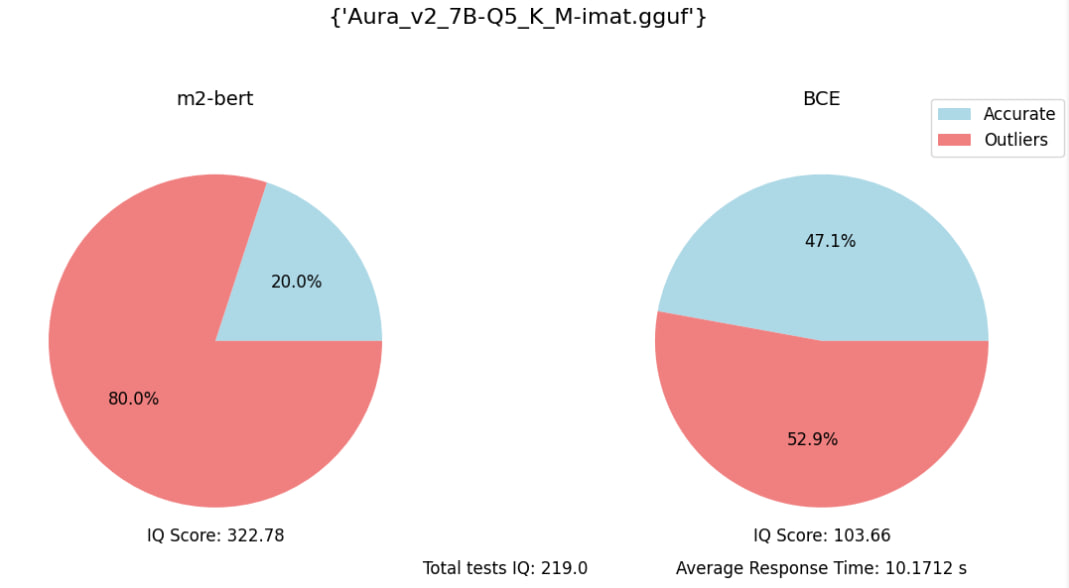
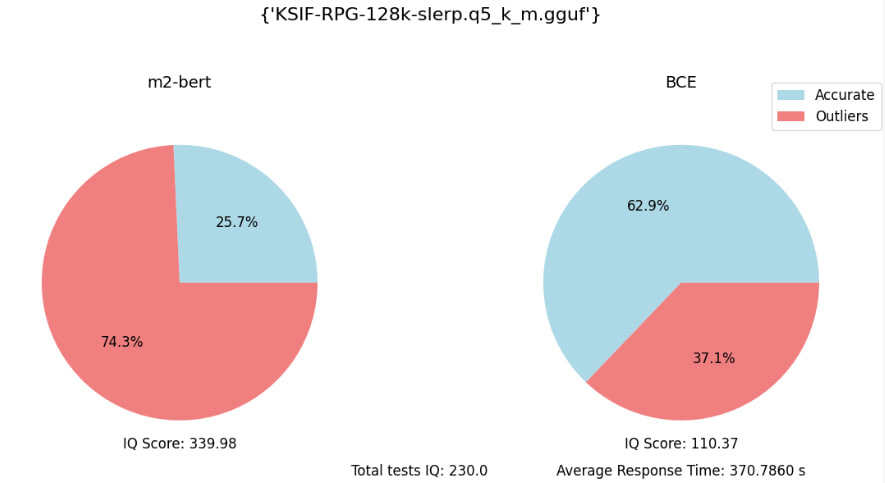
Eval embedding benchmark (with 70 specific quesions):





2-bit
3-bit
4-bit
5-bit
6-bit
8-bit
Install Unsloth Studio (macOS, Linux, WSL)
# Run unsloth studio
unsloth studio -H 0.0.0.0 -p 8888
# Then open http://localhost:8888 in your browser
# Search for AlekseiPravdin/KSIF-RPG-128k-slerp-gguf to start chatting