Instructions to use YTan2000/Qwen3.6-27B-TQ3_4S with libraries, inference providers, notebooks, and local apps. Follow these links to get started.
- Libraries
- llama-cpp-python
How to use YTan2000/Qwen3.6-27B-TQ3_4S with llama-cpp-python:
# !pip install llama-cpp-python from llama_cpp import Llama llm = Llama.from_pretrained( repo_id="YTan2000/Qwen3.6-27B-TQ3_4S", filename="Qwen3.6-27B-TQ3_4S.gguf", )
llm.create_chat_completion( messages = [ { "role": "user", "content": [ { "type": "text", "text": "Describe this image in one sentence." }, { "type": "image_url", "image_url": { "url": "https://cdn.britannica.com/61/93061-050-99147DCE/Statue-of-Liberty-Island-New-York-Bay.jpg" } } ] } ] ) - Notebooks
- Google Colab
- Kaggle
- Local Apps
- llama.cpp
How to use YTan2000/Qwen3.6-27B-TQ3_4S with llama.cpp:
Install from brew
brew install llama.cpp # Start a local OpenAI-compatible server with a web UI: llama-server -hf YTan2000/Qwen3.6-27B-TQ3_4S # Run inference directly in the terminal: llama-cli -hf YTan2000/Qwen3.6-27B-TQ3_4S
Install from WinGet (Windows)
winget install llama.cpp # Start a local OpenAI-compatible server with a web UI: llama-server -hf YTan2000/Qwen3.6-27B-TQ3_4S # Run inference directly in the terminal: llama-cli -hf YTan2000/Qwen3.6-27B-TQ3_4S
Use pre-built binary
# Download pre-built binary from: # https://github.com/ggerganov/llama.cpp/releases # Start a local OpenAI-compatible server with a web UI: ./llama-server -hf YTan2000/Qwen3.6-27B-TQ3_4S # Run inference directly in the terminal: ./llama-cli -hf YTan2000/Qwen3.6-27B-TQ3_4S
Build from source code
git clone https://github.com/ggerganov/llama.cpp.git cd llama.cpp cmake -B build cmake --build build -j --target llama-server llama-cli # Start a local OpenAI-compatible server with a web UI: ./build/bin/llama-server -hf YTan2000/Qwen3.6-27B-TQ3_4S # Run inference directly in the terminal: ./build/bin/llama-cli -hf YTan2000/Qwen3.6-27B-TQ3_4S
Use Docker
docker model run hf.co/YTan2000/Qwen3.6-27B-TQ3_4S
- LM Studio
- Jan
- vLLM
How to use YTan2000/Qwen3.6-27B-TQ3_4S with vLLM:
Install from pip and serve model
# Install vLLM from pip: pip install vllm # Start the vLLM server: vllm serve "YTan2000/Qwen3.6-27B-TQ3_4S" # Call the server using curl (OpenAI-compatible API): curl -X POST "http://localhost:8000/v1/chat/completions" \ -H "Content-Type: application/json" \ --data '{ "model": "YTan2000/Qwen3.6-27B-TQ3_4S", "messages": [ { "role": "user", "content": [ { "type": "text", "text": "Describe this image in one sentence." }, { "type": "image_url", "image_url": { "url": "https://cdn.britannica.com/61/93061-050-99147DCE/Statue-of-Liberty-Island-New-York-Bay.jpg" } } ] } ] }'Use Docker
docker model run hf.co/YTan2000/Qwen3.6-27B-TQ3_4S
- Ollama
How to use YTan2000/Qwen3.6-27B-TQ3_4S with Ollama:
ollama run hf.co/YTan2000/Qwen3.6-27B-TQ3_4S
- Unsloth Studio new
How to use YTan2000/Qwen3.6-27B-TQ3_4S with Unsloth Studio:
Install Unsloth Studio (macOS, Linux, WSL)
curl -fsSL https://unsloth.ai/install.sh | sh # Run unsloth studio unsloth studio -H 0.0.0.0 -p 8888 # Then open http://localhost:8888 in your browser # Search for YTan2000/Qwen3.6-27B-TQ3_4S to start chatting
Install Unsloth Studio (Windows)
irm https://unsloth.ai/install.ps1 | iex # Run unsloth studio unsloth studio -H 0.0.0.0 -p 8888 # Then open http://localhost:8888 in your browser # Search for YTan2000/Qwen3.6-27B-TQ3_4S to start chatting
Using HuggingFace Spaces for Unsloth
# No setup required # Open https://huggingface.co/spaces/unsloth/studio in your browser # Search for YTan2000/Qwen3.6-27B-TQ3_4S to start chatting
- Pi new
How to use YTan2000/Qwen3.6-27B-TQ3_4S with Pi:
Start the llama.cpp server
# Install llama.cpp: brew install llama.cpp # Start a local OpenAI-compatible server: llama-server -hf YTan2000/Qwen3.6-27B-TQ3_4S
Configure the model in Pi
# Install Pi: npm install -g @mariozechner/pi-coding-agent # Add to ~/.pi/agent/models.json: { "providers": { "llama-cpp": { "baseUrl": "http://localhost:8080/v1", "api": "openai-completions", "apiKey": "none", "models": [ { "id": "YTan2000/Qwen3.6-27B-TQ3_4S" } ] } } }Run Pi
# Start Pi in your project directory: pi
- Hermes Agent new
How to use YTan2000/Qwen3.6-27B-TQ3_4S with Hermes Agent:
Start the llama.cpp server
# Install llama.cpp: brew install llama.cpp # Start a local OpenAI-compatible server: llama-server -hf YTan2000/Qwen3.6-27B-TQ3_4S
Configure Hermes
# Install Hermes: curl -fsSL https://hermes-agent.nousresearch.com/install.sh | bash hermes setup # Point Hermes at the local server: hermes config set model.provider custom hermes config set model.base_url http://127.0.0.1:8080/v1 hermes config set model.default YTan2000/Qwen3.6-27B-TQ3_4S
Run Hermes
hermes
- Docker Model Runner
How to use YTan2000/Qwen3.6-27B-TQ3_4S with Docker Model Runner:
docker model run hf.co/YTan2000/Qwen3.6-27B-TQ3_4S
- Lemonade
How to use YTan2000/Qwen3.6-27B-TQ3_4S with Lemonade:
Pull the model
# Download Lemonade from https://lemonade-server.ai/ lemonade pull YTan2000/Qwen3.6-27B-TQ3_4S
Run and chat with the model
lemonade run user.Qwen3.6-27B-TQ3_4S-{{QUANT_TAG}}List all available models
lemonade list
Install from WinGet (Windows)
winget install llama.cpp
# Start a local OpenAI-compatible server with a web UI:
llama-server -hf YTan2000/Qwen3.6-27B-TQ3_4S# Run inference directly in the terminal:
llama-cli -hf YTan2000/Qwen3.6-27B-TQ3_4SUse pre-built binary
# Download pre-built binary from:
# https://github.com/ggerganov/llama.cpp/releases# Start a local OpenAI-compatible server with a web UI:
./llama-server -hf YTan2000/Qwen3.6-27B-TQ3_4S# Run inference directly in the terminal:
./llama-cli -hf YTan2000/Qwen3.6-27B-TQ3_4SBuild from source code
git clone https://github.com/ggerganov/llama.cpp.git
cd llama.cpp
cmake -B build
cmake --build build -j --target llama-server llama-cli# Start a local OpenAI-compatible server with a web UI:
./build/bin/llama-server -hf YTan2000/Qwen3.6-27B-TQ3_4S# Run inference directly in the terminal:
./build/bin/llama-cli -hf YTan2000/Qwen3.6-27B-TQ3_4SUse Docker
docker model run hf.co/YTan2000/Qwen3.6-27B-TQ3_4SQwen3.6-27B-TQ3_4S

TQ3_4S Release
This repository packages the model as a TurboQuant TQ3_4S GGUF for local deployment.
Runtime Compatibility
This quant requires a TurboQuant-capable runtime. For llama.cpp, use the turbo-tan/llama.cpp-tq3 fork rather than stock upstream llama.cpp if you want native TQ3_4S support.
- TurboQuant runtime fork: turbo-tan/llama.cpp-tq3
- LM Studio setup: docs/backend/LMStudio.md
Files
| File | Quant | Size |
|---|---|---|
Qwen3.6-27B-TQ3_4S.gguf |
TQ3_4S | ~13.0 GB |
chat_template.jinja |
chat template | text |
thumbnail.png |
model card image | png |
Local Validation
Hardware:
- RTX 5060 Ti 16 GB
Prompt processing:
llama-perplexity --chunks 10 -c 2048PPL = 6.2452 +/- 0.16138prompt eval = 712.02 tok/s
16 GB VRAM fit checks on RTX 5060 Ti with the recommended KV settings:
32kcontext fits64kcontext fits128kcontext does not fit
Runtime Notes
- Use a TurboQuant-capable llama.cpp build for best performance.
- For llama.cpp, the intended runtime is the
turbo-tan/llama.cpp-tq3fork. - The upstream family is multimodal-capable, but the public 27B repos used here do not currently expose a separate GGUF
mmprojartifact. - For llama.cpp chat usage, keep
--jinjaenabled so the bundled chat template is honored. - Upstream guidance recommends keeping at least
128Kcontext when possible for reasoning-heavy workloads. On smaller local GPUs, reduce context as needed to fit memory. - Upstream default sampling guidance differs between thinking and non-thinking mode; follow the official Qwen card if you are trying to reproduce base-model behavior.
Recommended llama.cpp Settings
Default prompt-processing settings on 16 GB:
llama-bench \
-m Qwen3.6-27B-TQ3_4S.gguf \
-ngl 99 \
-ctk q4_0 \
-ctv tq3_0 \
-fa 1 \
-p 2048 -n 0 -r 3
Default chat/server settings:
llama-server \
-m Qwen3.6-27B-TQ3_4S.gguf \
--host 127.0.0.1 --port 8080 \
-ngl 99 -c 4096 -np 1 \
-ctk q4_0 -ctv tq3_0 -fa on \
--jinja
Example
llama-cli \
-m Qwen3.6-27B-TQ3_4S.gguf \
--jinja \
-ngl 99 \
-c 4096
Build/runtime:
git clone https://github.com/turbo-tan/llama.cpp-tq3
Qwen3.6 Base Model
The upstream Qwen repository contains model weights and configuration files for the post-trained model in the Hugging Face Transformers format.
Those upstream artifacts are compatible with Hugging Face Transformers, vLLM, SGLang, KTransformers, and related runtimes.
Following the February release of the Qwen3.5 series, Qwen describes Qwen3.6 as the first open-weight Qwen3.6 variant, built for stronger stability and real-world utility.
Qwen3.6 Highlights
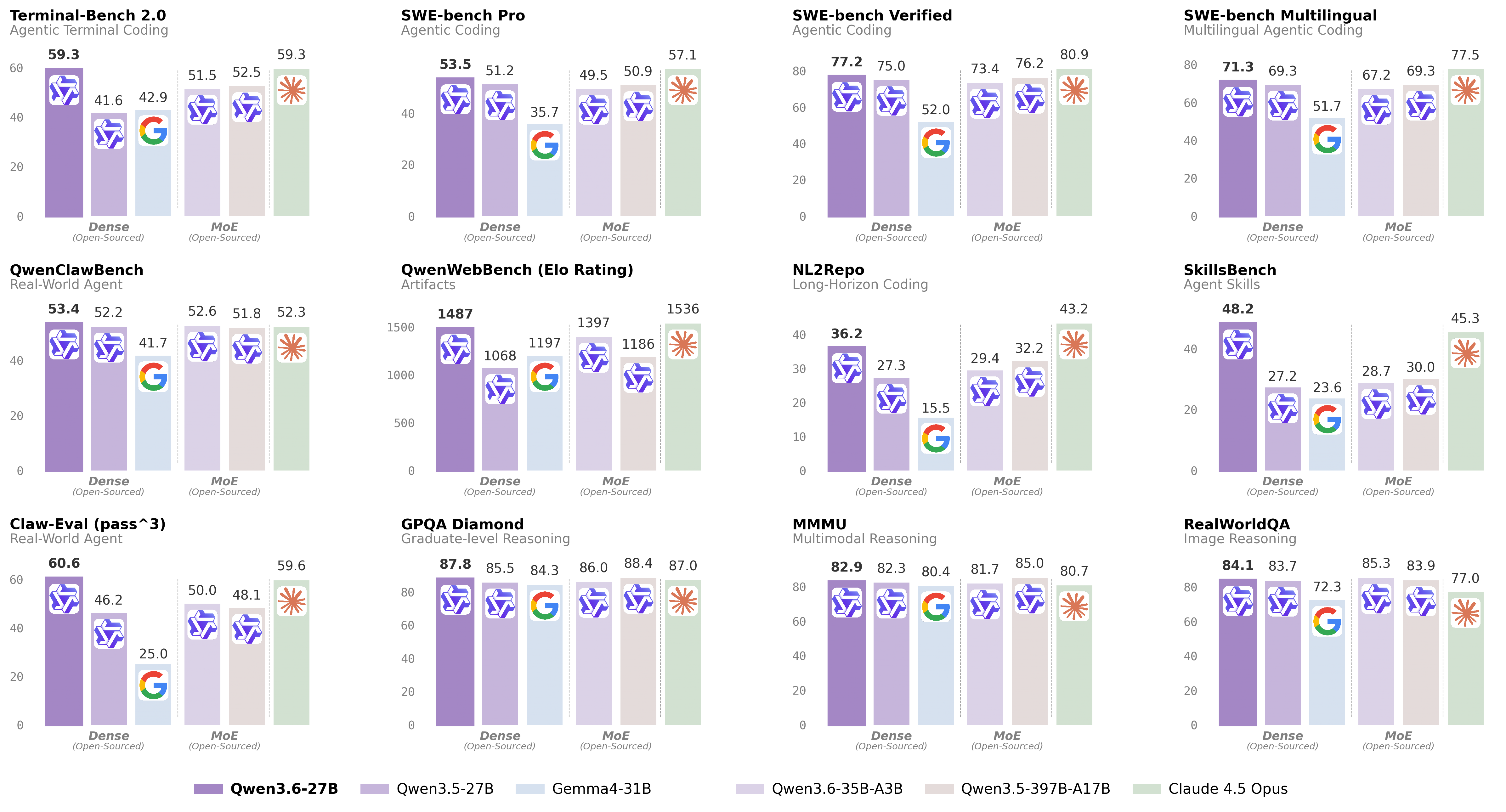
- Agentic Coding: the model handles frontend workflows and repository-level reasoning with greater fluency and precision.
- Thinking Preservation: the model family retains reasoning context across historical turns to reduce overhead during iterative work.
Model Overview
- Type: Causal Language Model with Vision Encoder
- Training Stage: Pre-training and Post-training
- Architecture:
qwen35 - Parameters:
27B - Layers:
64 - Embedding dimension:
5120 - FFN dimension:
17408 - Hidden layout:
16 × (3 × (Gated DeltaNet -> FFN) -> 1 × (Gated Attention -> FFN)) - Gated DeltaNet heads:
48forV,16forQK, head dim128 - Gated Attention heads:
24forQ,4forKV, head dim256 - RoPE dim:
64 - Native context:
262,144
Selected Upstream Benchmark Highlights
SWE-bench Verified:77.2Terminal-Bench 2.0:59.3SkillsBench Avg5:48.2GPQA Diamond:87.8AIME26:94.1MMMU:82.9AndroidWorld:70.3
Sources
- Upstream base model: Qwen/Qwen3.6-27B
- Upstream GGUF source used for conversion: unsloth/Qwen3.6-27B-GGUF
- Upstream blog and benchmark context: Qwen3.6-27B model card
- TurboQuant runtime fork: turbo-tan/llama.cpp-tq3
- Downloads last month
- 33,870
We're not able to determine the quantization variants.
Model tree for YTan2000/Qwen3.6-27B-TQ3_4S
Base model
Qwen/Qwen3.6-27B
Install from brew
# Start a local OpenAI-compatible server with a web UI: llama-server -hf YTan2000/Qwen3.6-27B-TQ3_4S# Run inference directly in the terminal: llama-cli -hf YTan2000/Qwen3.6-27B-TQ3_4S