

Trendyol-LLM-7b-chat-dpo-v1.0 models
Description
This repo contains all types of GGUF formatted model files for Trendyol-LLM-7b-chat-dpo-v1.0.

Quantized LLM models and methods
| Name | Quant method | Bits | Size | Max RAM required | Use case |
|---|---|---|---|---|---|
| Trendyol-LLM-7b-chat-dpo-v1.0.Q2_K.gguf | Q2_K | 2 | 2.59 GB | 4.88 GB | smallest, significant quality loss - not recommended for most purposes |
| Trendyol-LLM-7b-chat-dpo-v1.0.Q3_K_S.gguf | Q3_K_S | 3 | 3.01 GB | 5.56 GB | very small, high quality loss |
| Trendyol-LLM-7b-chat-dpo-v1.0.Q3_K_M.gguf | Q3_K_M | 3 | 3.36 GB | 5.91 GB | very small, high quality loss |
| Trendyol-LLM-7b-chat-dpo-v1.0.Q3_K_L.gguf | Q3_K_L | 3 | 3.66 GB | 6.20 GB | small, substantial quality loss |
| Trendyol-LLM-7b-chat-dpo-v1.0.Q4_0.gguf | Q4_0 | 4 | 3.9 GB | 6.45 GB | legacy; small, very high quality loss - prefer using Q3_K_M |
| Trendyol-LLM-7b-chat-dpo-v1.0.Q4_K_S.gguf | Q4_K_S | 4 | 3.93 GB | 6.48 GB | small, greater quality loss |
| Trendyol-LLM-7b-chat-dpo-v1.0.Q4_K_M.gguf | Q4_K_M | 4 | 4.15 GB | 6.69 GB | medium, balanced quality - recommended |
| Trendyol-LLM-7b-chat-dpo-v1.0.Q5_0.gguf | Q5_0 | 5 | 4.73 GB | 7.15 GB | legacy; medium, balanced quality - prefer using Q4_K_M |
| Trendyol-LLM-7b-chat-dpo-v1.0.Q5_K_S.gguf | Q5_K_S | 5 | 4.75 GB | 7.27 GB | large, low quality loss - recommended |
| Trendyol-LLM-7b-chat-dpo-v1.0.Q5_K_M.gguf | Q5_K_M | 5 | 4.86 GB | 7.40 GB | large, very low quality loss - recommended |
| Trendyol-LLM-7b-chat-dpo-v1.0.Q6_K.gguf | Q6_K | 6 | 5.61 GB | 8.15 GB | very large, extremely low quality loss |
The names of the quantization methods follow the naming convention: "q" + the number of bits + the variant used (detailed below). Here is a list of all the models and their corresponding use cases, based on model cards made by TheBloke:
q2_k: Uses Q4_K for the attention.vw and feed_forward.w2 tensors, Q2_K for the other tensors.q3_k_l: Uses Q5_K for the attention.wv, attention.wo, and feed_forward.w2 tensors, else Q3_Kq3_k_m: Uses Q4_K for the attention.wv, attention.wo, and feed_forward.w2 tensors, else Q3_Kq3_k_s: Uses Q3_K for all tensorsq4_0: Original quant method, 4-bit.q4_1: Higher accuracy than q4_0 but not as high as q5_0. However has quicker inference than q5 models.q4_k_m: Uses Q6_K for half of the attention.wv and feed_forward.w2 tensors, else Q4_Kq4_k_s: Uses Q4_K for all tensorsq5_0: Higher accuracy, higher resource usage and slower inference.q5_1: Even higher accuracy, resource usage and slower inference.q5_k_m: Uses Q6_K for half of the attention.wv and feed_forward.w2 tensors, else Q5_Kq5_k_s: Uses Q5_K for all tensorsq6_k: Uses Q8_K for all tensors
TheBloke recommends using Q5_K_M as it preserves most of the model's performance. Alternatively, you can use Q4_K_M if you want to save some memory. In general, K_M versions are better than K_S versions.
How to download GGUF files
Note for manual downloaders: You almost never want to clone the entire repo! Multiple different quantisation formats are provided, and most users only want to pick and download a single file.
The following clients/libraries will automatically download models for you, providing a list of available models to choose from:
- LM Studio
- LoLLMS Web UI
- Faraday.dev
Special thanks to TheBloke on Huggingface and Maxime Labonne on Github
Trendyol LLM v1.0 - DPO
Trendyol LLM v1.0 - DPO is a generative model that is based on Mistral 7B model. DPO training was applied. This is the repository for the chat model.
Model Details
Model Developers Trendyol
Variations base, chat, and dpo variations.
Input Models input text only.
Output Models generate text only.
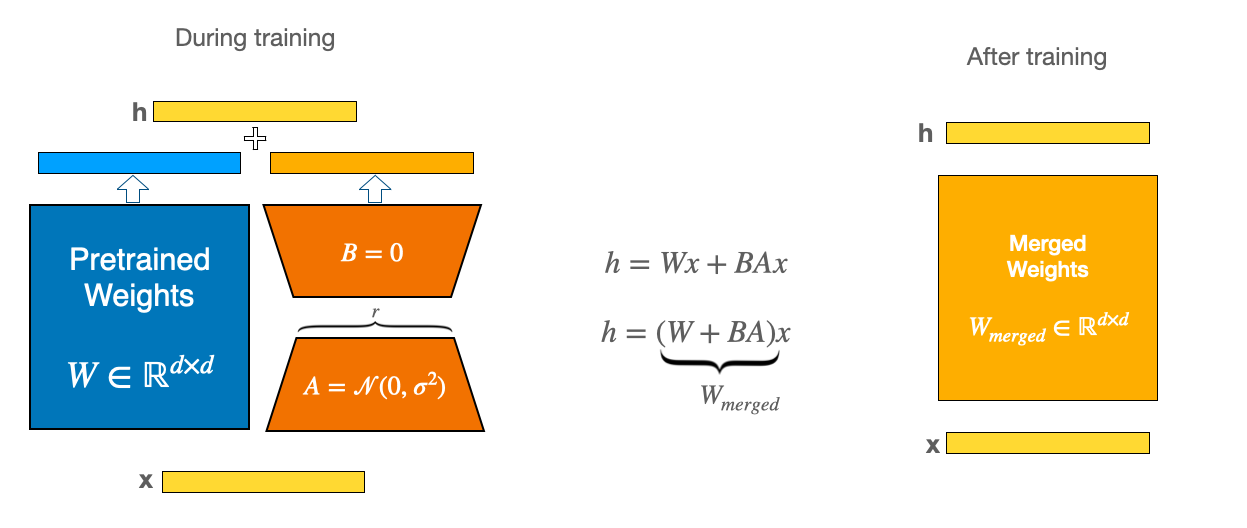
Model Architecture Trendyol LLM is an auto-regressive language model (based on Mistral 7b) that uses an optimized transformer architecture. Huggingface TRL lib was used for training. The DPO version is fine-tuned on 11K sets (prompt-chosen-reject) with the following trainables by using LoRA:
- lr=5e-6
- lora_rank=64
- lora_alpha=128
- lora_trainable=q_proj,v_proj,k_proj,o_proj,gate_proj,down_proj,up_proj
- lora_dropout=0.05
- bf16=True
- beta=0.01
- max_length= 1024
- max_prompt_length= 512
- lr_scheduler_type= cosine
- torch_dtype= bfloat16
Usage
from transformers import AutoModelForCausalLM, AutoTokenizer, pipeline

model_id = "Trendyol/Trendyol-LLM-7b-chat-dpo-v1.0"
tokenizer = AutoTokenizer.from_pretrained(model_id)
model = AutoModelForCausalLM.from_pretrained(model_id,
                                             device_map='auto',
                                             load_in_8bit=True)

sampling_params = dict(do_sample=True, temperature=0.3, top_k=50, top_p=0.9)

pipe = pipeline("text-generation",
                model=model,
                tokenizer=tokenizer,
                device_map="auto",
                max_new_tokens=1024,
                return_full_text=True,
                repetition_penalty=1.1
               )

DEFAULT_SYSTEM_PROMPT = "Sen yardımcı bir asistansın ve sana verilen talimatlar doğrultusunda en iyi cevabı üretmeye çalışacaksın.\n"

TEMPLATE = (
    "[INST] {system_prompt}\n\n"
    "{instruction} [/INST]"
)

def generate_prompt(instruction, system_prompt=DEFAULT_SYSTEM_PROMPT):
    return TEMPLATE.format_map({'instruction': instruction,'system_prompt': system_prompt})

def generate_output(user_query, sys_prompt=DEFAULT_SYSTEM_PROMPT):
    prompt = generate_prompt(user_query, sys_prompt)
    outputs = pipe(prompt,
               **sampling_params
              )
    return outputs[0]["generated_text"].split("[/INST]")[-1]

user_query = "Türkiye'de kaç il var?"
response = generate_output(user_query)
print(response)
with chat template:
pipe = pipeline("conversational",
                model=model,
                tokenizer=tokenizer,
                device_map="auto",
                max_new_tokens=1024,
                repetition_penalty=1.1
               )

messages = [
    {"role": "user", "content": "Türkiye'de kaç il var?"}
]

outputs = pipe(messages, **sampling_params)
print(outputs)
Limitations, Risks, Bias, and Ethical Considerations
Limitations and Known Biases
Primary Function and Application: Trendyol LLM, an autoregressive language model, is primarily designed to predict the next token in a text string. While often used for various applications, it is important to note that it has not undergone extensive real-world application testing. Its effectiveness and reliability across diverse scenarios remain largely unverified.
Language Comprehension and Generation: The model is primarily trained in standard English and Turkish. Its performance in understanding and generating slang, informal language, or other languages may be limited, leading to potential errors or misinterpretations.
Generation of False Information: Users should be aware that Trendyol LLM may produce inaccurate or misleading information. Outputs should be considered as starting points or suggestions rather than definitive answers.
Risks and Ethical Considerations
Potential for Harmful Use: There is a risk that Trendyol LLM could be used to generate offensive or harmful language. We strongly discourage its use for any such purposes and emphasize the need for application-specific safety and fairness evaluations before deployment.
Unintended Content and Bias: The model was trained on a large corpus of text data, which was not explicitly checked for offensive content or existing biases. Consequently, it may inadvertently produce content that reflects these biases or inaccuracies.
Toxicity: Despite efforts to select appropriate training data, the model is capable of generating harmful content, especially when prompted explicitly. We encourage the open-source community to engage in developing strategies to minimize such risks.
Recommendations for Safe and Ethical Usage
Human Oversight: We recommend incorporating a human curation layer or using filters to manage and improve the quality of outputs, especially in public-facing applications. This approach can help mitigate the risk of generating objectionable content unexpectedly.
Application-Specific Testing: Developers intending to use Trendyol LLM should conduct thorough safety testing and optimization tailored to their specific applications. This is crucial, as the model’s responses can be unpredictable and may occasionally be biased, inaccurate, or offensive.
Responsible Development and Deployment: It is the responsibility of developers and users of Trendyol LLM to ensure its ethical and safe application. We urge users to be mindful of the model's limitations and to employ appropriate safeguards to prevent misuse or harmful consequences.
- Downloads last month
- 220
2-bit
3-bit
4-bit
5-bit
6-bit
Model tree for tolgadev/Trendyol-LLM-7b-chat-dpo-v1.0-GGUF
Base model
mistralai/Mistral-7B-v0.1